
Sia in TRACES
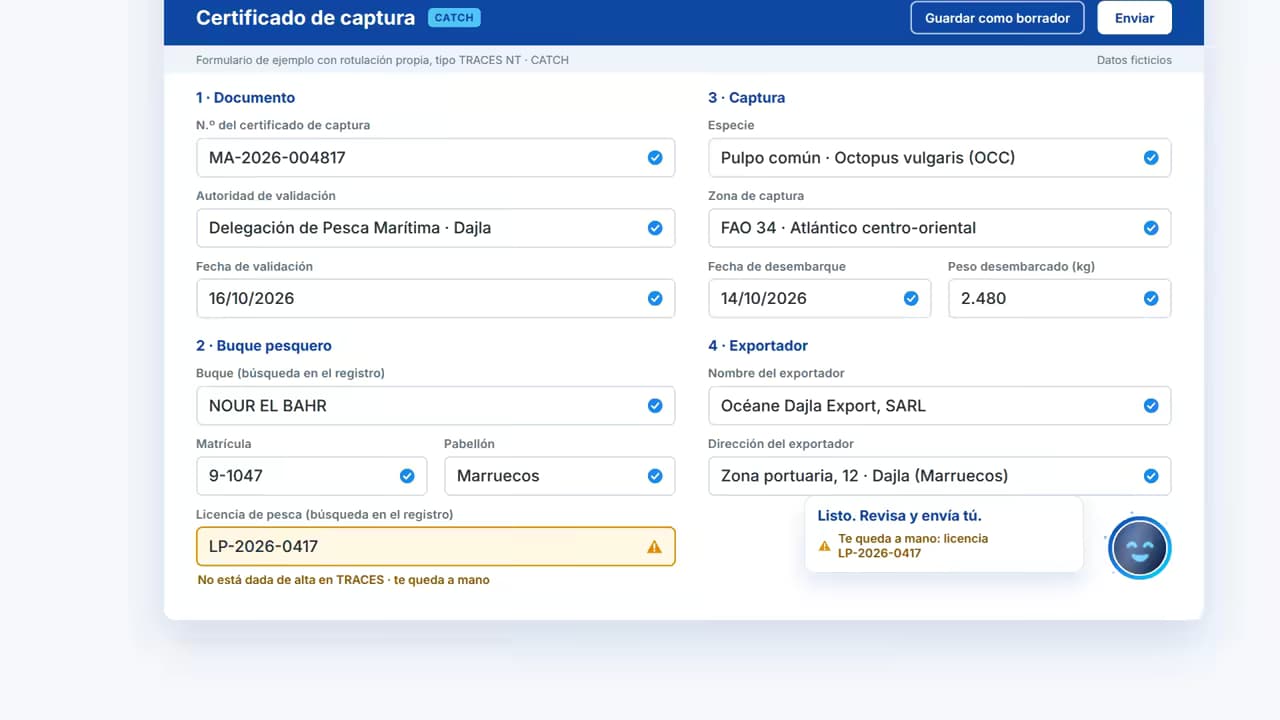
Catch certificates in CATCH
From the PDF, I fill in the catch certificate (CC), the simplified catch certificate (SC) and the processing statement (PS). The importer declaration (IM) is in development.
I’m Sia. I read the paperwork that reaches your brokerage, check that it adds up and tell you what is missing. Submitting, transmitting or finalising is always up to someone on your team: nothing I do goes through on its own.
Sia is Seautomatiza’s artificial intelligence for customs brokers and freight forwarders, built in Algeciras, Spain. It reads catch certificates, export accompanying documents (EADs) and email carrying documents, checks that the data matches and flags anything missing or inconsistent. It never submits or transmits anything on its own: a person at the brokerage always reviews and decides.
Meet Sia
What I do
I read the paperwork as it arrives: catch certificates in the language of the flag state, EADs scanned into a single stack, and emails full of forwards and ZIP files.
I check the EADs against the loading list, look up each vessel by its registration number in TRACES and see whether an email has everything its procedure needs.
I tell you what doesn’t match, which document is missing and what I couldn’t read, and why. Anything doubtful I mark for a person to look at: I don’t make things up.
One Sia
From the inbox to the clearance platform and on to TRACES: the same face tells you what I’m doing, what I’ve finished and what I couldn’t read.
Where I work
Catch certificates in CATCH
From the PDF, I fill in the catch certificate (CC), the simplified catch certificate (SC) and the processing statement (PS). The importer declaration (IM) is in development.
EAD reading and arrival notification (CC507)
I read the EADs on each truck, check them against the loading list and prepare the CC507 for your team to review. Import, export and transit are in development.
Sorts and flags
I read the customs email you receive, sort it by procedure, tell you which document is missing and, if your agency turns it on, file it in its folder. I don’t reply to or send anything.
What I’ve done, in plain sight
Your brokerage’s dashboard shows what I’ve done for each procedure, how much time I’ve saved you and what is still done by hand.
What I don’t do
| What changes | Your team decides | What I do |
|---|---|---|
| TRACES | Your team decidesChecks what I’ve flagged and finalises the certificate under their own login | What I doI fill in the certificate from the PDF and save it as a draft |
| Clearance | Your team decidesReviews it, and your clearance software transmits it. I don’t transmit anything to the Spanish Tax Agency (AEAT) or load data into that software | What I doI read the EADs, flag what doesn’t match and prepare the CC507 |
| Your team decidesDecides what I leave in “Unsorted” and sends whatever needs sending. I don’t reply to or send emails | What I doI sort each email, say what is missing and, if your agency turns it on, file it in its folder | |
| Dashboard | Your team decidesLooks at the numbers and decides what to automate next | What I doI show what I’ve done and the time I’ve saved you |
Security
AI is only useful if you can trust it. We treat your documents as seriously as you treat your clients’.
We sign a data processing agreement (GDPR art. 28) with each brokerage.
Submitting, transmitting or finalising is always decided by a person.
Your brokerage
The document leaves just as it reached you.
Server in the EU
The platform and the dashboard are hosted in the European Union.
Google AI in a European region
Documents are processed in the EU.
Back to your team
They review what Sia prepared and decide.
FAQ
Sia is Seautomatiza’s AI for customs brokers and freight forwarders. It is the same Sia in everything we set up for you: the TRACES extension, the clearance platform, the email agent and the dashboard. It reads the documents, checks that they match and flags anything missing or inconsistent; reviewing and deciding is always your team’s job.
No. Nothing Sia does goes through on its own. In TRACES it saves the certificate as a draft and your clerk finalises it. For clearance it prepares the arrival notification (CC507), but it doesn’t transmit anything to the Spanish Tax Agency (AEAT) or load data into your clearance software. In your inbox it doesn’t reply to or send anything. A person always has the final say.
In use: the TRACES extension, which fills in the catch certificate (CC), the simplified catch certificate (SC) and the processing statement (PS), and the email agent, which sorts customs email, flags what is missing and, if your agency turns it on, files it in its folder. Rolling out: EAD reading and the arrival notification (CC507). In development: the importer declaration (IM) in TRACES, and import, export and transit for clearance.
It tells you. Anything it couldn’t read or resolve is marked for a person to look at: a blurred registration number on a certificate, an EAD that doesn’t match the loading list or an email that goes to “Unsorted”. Sia would rather flag than guess, and if a document couldn’t be read, it tells you why and offers to read it again.
Documents are processed in the EU: the server is in the EU and the Google AI that reads them runs in a European region. We sign a data processing agreement (Article 28 GDPR) with each agency. It works the same way in TRACES, for clearance, in your inbox and in the dashboard.
No. Sia works alongside what you already use: TRACES NT, where everyone keeps logging in with their own account; your mailbox; and your clearance software, which keeps transmitting as it does today. What Sia has done and the time it has saved you are in your brokerage’s dashboard, under “Client login”.
It depends on each agency: the volume of work and the procedures you want to automate. That is why there is no fixed rate: we first see how you work and then prepare a quote tailored to you.
We will show you in a 30-minute demo, no strings attached.